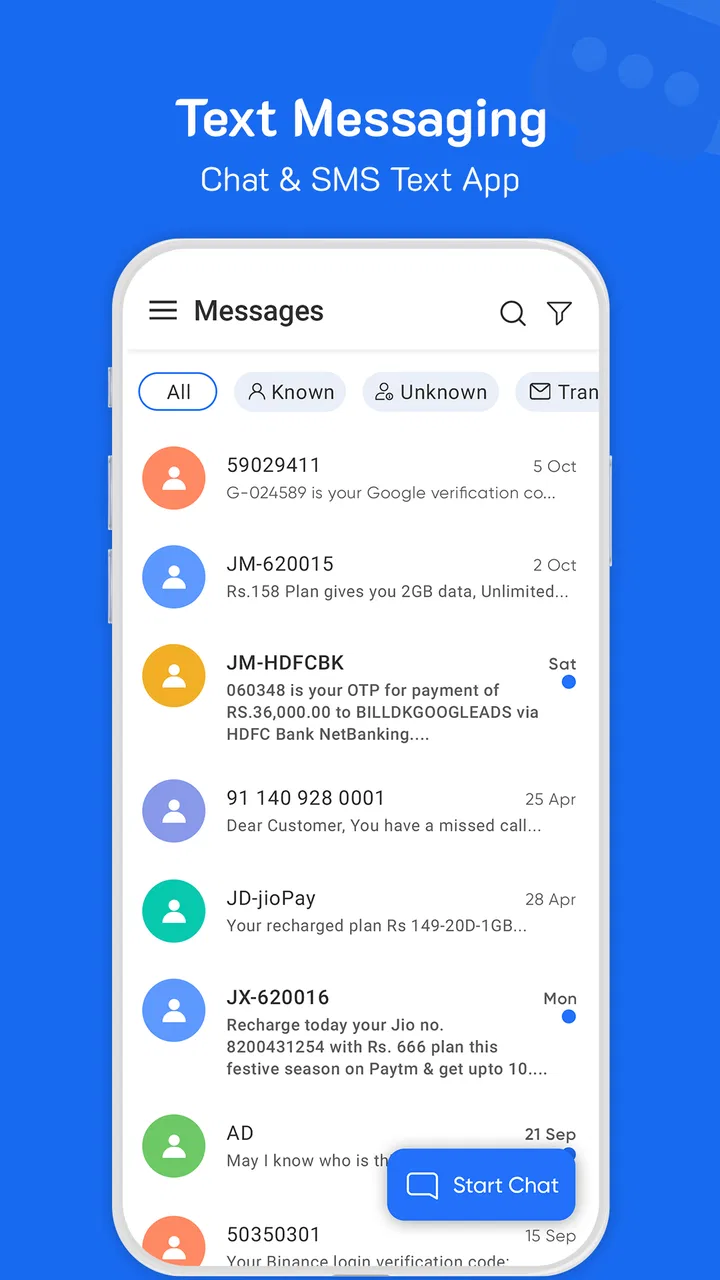
Messages: SMS & Text Messaging
- 3.8
- Rating
- 100.00K
- Installs
- Free
- Price

 Analysis by App-foxy
I approached Messages: SMS & Text Messaging as a replacement for the standard texting tool rather than as a social network or a full internet messenger. That distinction matters. Its focus is everyday communication: SMS, ordinary text conversations, group chats, and an aftercall feature that can help continue a conversation once a phone call ends. If you want one place for simple mobile messaging, the idea is easy to understand. If you expect the deep media sharing, device syncing, and account-based extras found in larger chat platforms, your expectations need to be more modest.
The app is free, aimed at everyone, and belongs to the communication category. It was developed by Peakeme Game, and its current version is 1.2.8. I found the most useful way to judge it is not by how many decorative options it offers, but by how reliably it handles the small moments that make texting useful: finding a contact, replying to an existing thread, starting a group, and getting back to a conversation after a call.
Where the first-use experience can become confusing
The first friction point with any SMS application is that sending a message is not controlled by the interface alone. The app has to work with the phone’s messaging setup, the chosen SIM or mobile connection, contacts, and the system’s default-app behavior. That means a screen that looks ready may still leave a new user wondering why an outgoing message is delayed or why another application opens instead.
You May Also Like

 Blood Strike: 2.5 Anniversary
Blood Strike’s Loadouts Turn Every Drop Into a Tactical Gamble
A close look at Blood Strike’s custom loadouts: how fast access to signature weapons reshapes its battle royale rhythm, rewards preparation, and narrows the gap between fights.

 Pandora - Music & Podcasts
Pandora’s Music Is Easy to Start, but Harder to Recover
Pandora’s strength is its low-effort path from a seed to a station. Its weak spot is how much confidence it asks you to place in connection, setup, and quiet recovery.

 8 Ball Pool
 Is Built on Rivalries, Rematches, and Routine
A close look at the rivalries, rematches, shared routines, and unanswered safety questions that turn a quick pool match into a persistent mobile community.

 Samsung Music
’s Quiet Strength Is Playing What You Already Own
Its reach comes less from spectacle than from dependable access to a personal library. That simplicity is both the app’s strongest retention engine and its ceiling.

 AccuWeather: Weather Radar
AccuWeather Review: A Quick, Clear Forecast for Everyday Decisions
For everyday plans, the best forecast is the one you can understand quickly. AccuWeather makes rain timing, radar, and local conditions easy to act on, with a few trade-offs.

 Hill Climb Racing
Why Hill Climb Racing Still Turns Crashes Into One More Run
A tiny car, a bumpy hill and one more upgrade: Hill Climb Racing keeps resurfacing because its simple chaos makes every near-miss feel personal.
More From Our News Desk
View All News


I would begin by treating the application as a phone tool, not as an account-based chat service. A normal SMS conversation depends on mobile service, so a Wi-Fi connection by itself does not guarantee that a text will go through. This is one of the most important differences from internet messengers. When a friend says a message is “stuck,” the problem may be the network or the phone line rather than the conversation screen.
Contact selection can also cause avoidable mistakes. Starting a fresh conversation by typing a number gives you a chance to check the country prefix and the intended recipient before sending. For regular contacts, using the saved entry is quicker, but I still recommend checking the displayed number when a thread has more than one person with a similar name. That small habit is especially useful when creating a group chat.
The aftercall feature gives the app a slightly different rhythm from a basic inbox. In a practical situation, I might finish a short call with a delivery driver, a family member, or a colleague and then need to send a follow-up detail. Having that action close to the call experience can reduce the chance of forgetting. It is less valuable for people who already handle every follow-up through another messenger, but it makes sense for users who mostly communicate through their phone number.
Group messaging deserves a realistic expectation. A group thread is convenient for plans, reminders, and household coordination, but SMS-based group behavior can vary depending on the carrier and device configuration. I would not use a group conversation as the only place for urgent information until I had tested how replies appear and whether everyone receives them as expected.
The app has an average rating of 3.8 from around 959 ratings, with 37 written reviews. I read that as a sign to approach it practically: it has enough public use to be worth considering, but the rating is not a reason to assume that every phone will behave identically. Messaging apps are unusually sensitive to device settings, SIM arrangements, and network conditions.
What I would check before blaming the conversation screen
When a message does not appear to send, I would first look at the phone’s signal and confirm that the correct number is being used. I would then reopen the thread instead of repeatedly tapping send. Repeated attempts can create duplicate messages once the connection recovers, which is an easy problem to overlook when the interface feels slow.
I would also check whether the conversation is actually an SMS thread or a group discussion with different delivery behavior. A one-to-one text is a better test than a complicated group. Sending a short message to a trusted contact helps separate an app problem from a recipient-specific issue without creating confusion for several people.
Another useful check is whether the phone has more than one SIM or line. In that situation, the selected line can affect outgoing messages. The safest workflow is to confirm the intended line before testing, especially if one number is personal and the other is used for work. This is not an advanced feature of the app; it is a practical phone-level detail that often explains apparently random results.
Setting it up without creating a bigger messaging problem
I would set up Messages: SMS & Text Messaging when I have a few uninterrupted minutes, not while trying to send an urgent text. The first goal is to know which application the phone will use for new SMS conversations. If the phone asks which messaging app should handle texts, choose deliberately rather than dismissing the prompt. Switching between apps in the middle of a conversation can make it harder to tell where a thread or draft went.
Before making it the main tool, I would open an existing conversation and send a harmless test message to someone who can reply. This checks the complete path: opening the thread, composing, sending, receiving, and returning to the conversation. It also gives you a chance to see whether the layout feels comfortable for longer exchanges, where a small navigation annoyance becomes more noticeable.
For group use, start with a small, non-urgent conversation. Confirm that the intended people are listed before sending the first message, and avoid using a group test that contains private information. A group is not merely a longer contact list; it changes who sees replies and how the conversation develops. Taking a moment to verify the recipients is more valuable than searching for a setting after an accidental send.
I would prepare the contact list before judging the app’s speed. A messy address book can make any messaging tool feel unreliable because the same person may appear under several names or numbers. If a conversation opens with an unfamiliar number, compare it with the contact details on the phone rather than assuming the app has mixed up the thread.
The app is free, which makes testing low-risk for someone who wants a simpler SMS interface. Its content rating is Everyone, so it is positioned for ordinary general communication rather than a mature-only audience. It requires at least Android 10, an important practical point for anyone using an older phone. The install base is over 100K, so it is not an obscure experiment, although that alone does not guarantee that it will suit a particular handset.
One question many people have is whether this is the right choice for internet chat. I would say no if your main need is an account-based service that works across several devices or remains available when cellular texting is unavailable. This app’s appeal is closer to direct phone-number messaging. It fits someone who wants SMS, text conversations, group chat, and a convenient aftercall follow-up in one communication tool.
A sensible everyday workflow
My preferred routine would be simple. I would use saved contacts for familiar people, type a number manually only when necessary, and reread the recipient line before sending anything sensitive. For a group, I would name the purpose mentally before composing: shopping, a trip, a family update, or a work reminder. That prevents a quick message from being sent to a similarly named one-to-one thread.
After a phone call, I would use the aftercall option for a short, specific follow-up rather than starting a long conversation automatically. For example, after arranging a repair visit, I might send the agreed time or address. The feature is most useful when the call has already established the context. It is less useful when I need rich files, reactions, or a continuing online discussion, where a dedicated internet messenger may be more suitable.
For longer messages, I would compose in short paragraphs and check the whole text before sending. SMS conversations can become difficult to scan when a single thought is broken into several separate messages. A brief review also catches the common errors that matter in practical communication: the wrong date, an incomplete address, or a missing digit in a phone number.
Notifications are another part of the workflow, but I would not assume that every delay originates inside the app. Battery-saving behavior, muted conversations, system notification controls, and weak reception can all change how quickly a new message is noticed. If incoming texts arrive only after opening the app, I would inspect the phone’s notification and battery settings before reinstalling anything.
Recovering when a conversation appears to disappear
If a thread seems missing, I would first search by the contact’s number or name and check whether I am looking at a different conversation than expected. A message can feel lost when it has been started from a new number format or when a contact has several entries. The safest response is to search calmly rather than immediately sending a new message that duplicates the original.
If a draft vanishes, I would recreate the message from the essential facts instead of repeatedly switching between screens. For an important text, keeping a short copy in a note until it has successfully sent is sensible. I would not rely on a draft as the only record of an address, appointment, or instruction.
When sending fails, I would try a short message to a trusted recipient after confirming mobile service. If that succeeds, the original issue may involve the destination number, a group configuration, or the specific thread. If it fails as well, the phone’s connection or messaging setup deserves attention. Restarting the phone can be a reasonable general troubleshooting step, but I would do it after noting any unsent text so that I do not lose track of what still needs to be sent.
For a group that behaves strangely, I would test one-to-one messaging first. This is a useful diagnostic because it reduces the number of variables. If individual texts work but the group does not, I would avoid treating that as proof that the app is broken. Group delivery can involve carrier handling and recipient devices, so a different communication method may be the better choice for a time-critical group announcement.
When the app is not the real cause
Texting problems are often blamed on the visible app because that is where the user notices them. In reality, several layers sit underneath it. Mobile coverage, account status with the carrier, SIM selection, a blocked number, and the recipient’s own phone can all affect the result. A clear troubleshooting process starts with the simplest external checks.
One useful test is to compare behavior with another trusted contact. If messages fail only with one person, check the number and consider whether that recipient has changed devices or lines. If messages fail with everyone, look at signal, mobile service, and the phone’s messaging configuration. This comparison is more informative than repeatedly clearing screens or reinstalling the application.
Another overlooked cause is storage and system behavior. A phone that is heavily restricted in the background may delay notifications or make an app appear inactive. A nearly full device can also create broader instability. I would check the phone’s available space and system updates as general maintenance, while remembering that an update is not a guaranteed cure for a carrier or SIM issue.
Privacy expectations should also shape the decision. This is a communication app for SMS and text messaging, so I would avoid assuming that it offers the same privacy model as an end-to-end encrypted internet messenger. For sensitive conversations, I would choose a service whose privacy features match the subject matter and the needs of everyone involved. The convenience of a phone-number thread should not be confused with a particular security guarantee.
Likewise, people who need seamless conversations across a phone, tablet, and desktop may prefer a platform designed around synchronized accounts. Messages: SMS & Text Messaging makes more sense for direct mobile communication than for a large multi-device workspace. That is not a flaw in its basic purpose; it is a boundary that should be clear before moving all conversations into it.
I would also skip it if my daily communication is mostly built around voice notes, large media files, live reactions, channels, or communities. Those needs are better served by a full internet messenger. The app becomes more attractive when my priority is a straightforward number-based conversation, especially if I like the idea of following a call with a quick text without changing communication habits.
How it compares with the usual alternatives
Compared with the phone’s built-in SMS application, its strongest argument is the combination of ordinary texting, group conversations, and the aftercall workflow. Whether that feels like a real improvement depends on how well the layout fits your habits. If the default app already handles your messages cleanly and you never need aftercall follow-ups, changing may add more adjustment than benefit.
Compared with internet messengers, the advantage is directness: phone-number texting does not require convincing every contact to join a new service. The trade-off is that SMS depends more heavily on mobile service and carrier behavior, while internet platforms often provide richer conversation tools. I would choose this app for practical, low-complexity communication, not for replacing every chat platform on my phone.
Compared with a bundled manufacturer messaging tool, the decision comes down to workflow and comfort rather than a universal winner. Some users want the familiar system experience; others prefer trying a separate communication app with a different approach to conversations and aftercall follow-up. I would test it with normal, non-sensitive messages for a few days before moving important group routines over.
My practical verdict after using it as a daily SMS tool
Messages: SMS & Text Messaging is a reasonable free option for someone who wants phone-based communication gathered around texting, group chat, and follow-up after calls. I like the practical focus. It does not need to pretend to be a social platform to be useful, and the aftercall idea addresses a real everyday gap: remembering to send the detail that was agreed during a phone conversation.
The main caution is that setup and troubleshooting are inseparable from the phone itself. Before deciding that the app is unreliable, I would verify the selected line, mobile service, recipient, notification behavior, and whether the issue occurs in a one-to-one test. Those checks make the experience much less frustrating and help distinguish an app problem from a messaging-system problem.
Peakeme Game’s app has reached over 100K installs and holds a 3.8 average, which places it in the category of a usable, actively tried communication tool rather than an automatic replacement for every messaging service. Its Everyone age rating and free access make experimenting straightforward, while the Android 10 minimum means older devices may not be candidates.
My recommendation is conditional but positive: try it if your communication is mostly SMS and you want a convenient bridge between calls and follow-up texts. Keep your expectations grounded, test group behavior before relying on it, and choose a richer internet messenger when synchronized devices, media-heavy chats, or stronger privacy controls are the priority. For the right phone-centered routine, it can be a practical alternative; for a complete modern chat ecosystem, it is not the tool I would choose.
FAQs for Messages: SMS & Text Messaging
01What is Messages: SMS & Text Messaging, and what can I use it for?
Messages: SMS & Text Messaging is a mobile communication app designed for sending and receiving traditional SMS and MMS messages. After reviewing its main functions, the app appears focused on keeping conversations organized while offering a convenient interface for texting contacts, sharing photos or other media, and managing message threads. It is intended for users who want an alternative to their phone’s default messaging application.
02Does Messages: SMS & Text Messaging require an internet connection?
The basic SMS function generally works through your mobile carrier, so an internet connection is not normally required to send or receive standard text messages. However, features involving MMS, media sharing, app services, advertisements, updates, or additional online tools may require mobile data or Wi-Fi. Users should also remember that carrier charges can apply, depending on their mobile plan and region.
03Is Messages: SMS & Text Messaging free to download and use?
The application may be available to download at no initial cost, but “free” does not necessarily mean that every function is completely without limitations. Standard SMS and MMS messages can still be charged by your carrier, particularly if your plan does not include them. The app may also contain advertisements or optional in-app purchases, so checking the store listing and permissions before installation is recommended.
04Is Messages: SMS & Text Messaging safe for private conversations?
The app can be used for everyday texting, but users should not automatically assume that SMS conversations are end-to-end encrypted. Traditional SMS messages are handled through mobile networks and may not provide the same privacy protections as secure messaging services. Before sharing sensitive information, review the app’s privacy policy, requested permissions, data practices, and whether any available security features meet your personal requirements.
05Can I use Messages: SMS & Text Messaging as my default messaging app?
On compatible Android devices, the application may be set as the default SMS app, allowing it to handle incoming and outgoing text messages from one central interface. The exact setup process depends on the phone model and operating-system version. iOS users should be aware that Apple restricts how third-party apps access SMS functions, so availability and default-app capabilities may differ significantly from Android.
Pros
- Simple interface makes sending and organizing texts easy
- Supports group conversations for keeping several contacts connected
- Conversation search helps locate older messages quickly
- Notification controls reduce interruptions from incoming texts
- Works well for basic SMS communication without unnecessary features
Cons
- Some features may depend on your carrier or Android version
- Advanced messaging support can vary between devices and networks
- Spam protection may not block every unwanted message
- Backup and restore options may be limited compared with larger chat apps
- SMS messages may incur carrier charges when not included in your plan

Messages: SMS & Text Messaging
Gallery